Online course platform
A complete system for selling online courses, which I built from scratch in about six weeks, working with AI coding agents. The customer goes from an ad through a quiz and a basket to payment, the invoice issues itself, and lesson access follows immediately. The owner handles courses, prices, offers, coupons and refunds in a panel.
The brief
The goal was to sell courses without a course platform’s subscription or revenue cut (ordinary payment fees remain), on a purchase path of its own: ad, quiz, a full-package offer, a basket with an add-on, payment, invoice and instant course access.
Most traffic comes from ads on phones, inside the in-app browsers of Facebook and Instagram. The site has to behave there as in a normal browser, and a customer must not lose quiz progress or the basket.
What I built
- Sales funnelAn entry product, a full-package offer, a cheaper alternative after a no, and a basket with an add-on at the end. The system guides the customer by itself.
- Quiz with an instant resultSix questions and three profiles. The customer gets a description of their profile, an exercise matched to the result and a starting course, computed in the browser so it appears at once.
- BLIK and card paymentsStripe Checkout with BLIK, cards, Apple Pay and Google Pay. If a notification from the gateway never arrives, the system checks paid sessions every 5 minutes and grants access.
- Invoices without retypingAn invoice or receipt in Fakturownia after every purchase, the PDF emailed to the customer, and a correction note on refund.
- Refunding one course of an orderThe Stripe refund, the invoice correction and removed access, from one place in the panel.
- Learner areaModules and video lessons with saved progress, materials behind links valid for minutes, course reviews and a post-purchase survey.
- Ads that see the salesPurchases and sign-ups reach the ad platform from the browser and the server with one shared ID, so they are neither lost nor counted twice. Only after consent.
- Emails that protect the saleFifteen templates: welcome with password setup, three abandoned-basket reminders, the quiz result and the invoice.
- Owner panelCourse and offer editors, prices synced with Stripe, coupons, customer access, each visitor’s path through the funnel and a log of sent emails.
- Backups and secretsHourly backups to a separate account, restorable from the panel, and service keys in Azure Key Vault rather than in code.
The diagram, step by step
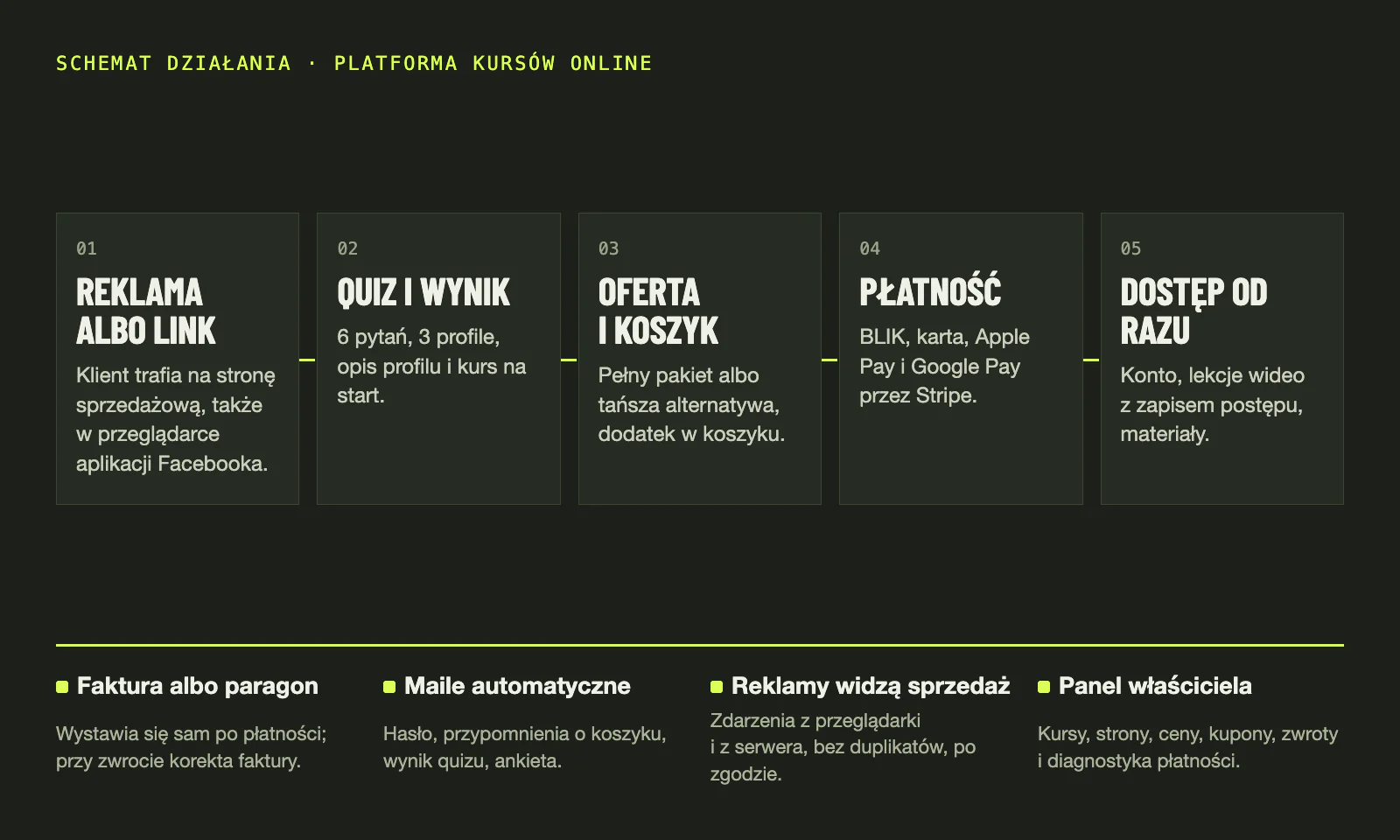
The five steps of the diagram: what the customer sees and what the system does in the meantime.
- Ad or linkThe sales page opens at once because its content is built into the site, and the system fetches the current offer and prices in the background. The terms and privacy policy open in a panel on the same page, so in the Facebook and Instagram in-app browsers the customer stays in the purchase, and “back” simply closes the panel.
- Quiz and resultSix questions with four answers each, a progress bar and a way back to the previous question. Once the customer enters an email, the system saves the answers and shows one of three profiles: its description and an exercise for today matched to that profile. The result and the exercise also arrive by email, with a link that opens the result on another device too.
- Offer and basketAfter a click below the result, the customer first sees the full package with its price and a link comparing all three packages. With the cheaper packages, the add-on is a single tick box in the basket. Anyone who buys a cheaper package is offered an upgrade to the full one after payment for just the difference, and the system shows that offer only when the amount matches to the penny, so it never charges a wrong sum.
- PaymentThe customer accepts the terms, and the consent is stored with the order, together with the date, time and version of the terms. They pay by BLIK, card, Apple Pay or Google Pay on Stripe’s secure page, which asks for an address and an optional VAT number. The system recalculates the total itself and never charges more than the customer saw: if the price has gone up in the meantime, it stops the payment and asks them to confirm again.
- Instant accessOnce payment is confirmed, the customer immediately has access to every course in the order and receives a welcome email. A new customer finds a link in it to set a password. Videos pick up where the customer left off, and a lesson counts as done once playback reaches 90% of the recording, or with one button. The customer downloads materials through a link valid for 10 minutes.
What runs in the background
The four items along the bottom of the diagram, which work alongside the main purchase path.
- Invoice or receiptOnce payment is confirmed, the document is issued in the background: a VAT invoice if the customer gives a VAT number, otherwise a receipt. The system takes the buyer’s details from the payment, so nobody retypes anything. The PDF arrives by email and is also in the customer’s account.
- Automatic emailsThe quiz result arrives once the email is given, the welcome after payment, and a survey invitation about an hour after the first purchase. Anyone who leaves a purchase unfinished gets three reminders: the first after an hour, the next two on the following mornings at 8:00. A purchase or an unsubscribe stops the rest.
- Ads that see the salesThe ad pixel starts only after marketing consent. With that consent the server also sends the purchase itself, under the same ID. The ads see the sale even when the browser blocks the pixel, and when both signals arrive, the purchase counts once.
- Owner panelThe owner sets prices in Stripe, and every hour the system carries them over to the courses. In the payments list, orders that need attention are highlighted, with buttons next to them: grant missing access, retry the invoice or receipt, refund a single course.
When something goes wrong
I built a separate safeguard for each of these situations: the system resolves it by itself or flags it to the owner in the panel, instead of losing the order.
- The payment gateway’s notification never arrivedThe thank-you page asks the server about that payment at once, and a background job that runs every 5 minutes checks unconfirmed orders with Stripe. If the payment went through, the customer gets access, the document and the emails, and an expired payment is marked as abandoned.
- The Facebook app reloaded the pageAnswers, the chosen package and the email are saved in the browser, and the step in the page address. If the app wipes that memory, the system fetches the answers and email from the server, and on the entry-product page the basket as well. The customer returns to their result instead of an empty quiz. An accidental “back” after the result does not send them to the questions either.
- The customer backed out of paymentThe customer returns to the basket with the same contents and a note that they can finish the purchase. On the quiz path, “back” then leads to the package choice, not back to the payment page. If the payment went through after all, the system checks this with Stripe and completes the order instead of abandoning it.
- An invoice could not be issuedThe system tries up to three times, two hours apart. After that it marks the invoice or receipt as failed in the panel, and the owner retries it with one button. Before each attempt it checks whether a document for that order already exists, so a second one is never created.
- A refund or a card disputeA refund from the panel returns the money, removes access to the refunded courses and, for an invoice, issues a correction. A full refund made directly in Stripe works the same way. A card dispute closes access to the order automatically, and if the seller wins it, access comes back.
In numbers
- 3funnel types on one engine: entry product, quiz and a premium-programme application
- 15automatic emails guide the customer from sign-up to invoice
- 5 minhow often the system checks that no payment was lost
- 6 wksfrom the first line of code to production
Technology
- Angular
- .NET 10
- Azure Functions
- Azure Static Web Apps
- Azure Storage
- Azure Key Vault
- Stripe
- Fakturownia
- SendGrid
- Meta Conversions API
- Vimeo
- Bicep
I do not name the courses or the brand the platform sells under. Instead of screenshots I show how it works, because the screens hold real customers’ data.
Selling courses
or services online?
Describe what you sell and how buying works today. I will reply with which part of a path like this would help you most and what it costs.
Jonasz Jankowski · Direct collaboration · Mikołów (Silesia), remote across Poland
- I reply myself within one working day.
- A short call about the goal, features, materials and integrations.
- You get the scope in stages and a fixed amount before any work starts.