AI app for video scripts
A web app for creators, brands and agencies that make short videos. From a topic or a link it produces sourced research, a hook and a script in a chosen style, then voice-over and video. Plans, tokens, teams and invoices run in the same system. The app is awaiting launch.
The brief
A team making short videos usually juggles several tools: one to watch creators, one for transcripts, one to write, one for voice-over, and invoicing on the side. The goal was one place from idea to finished file.
The second difficulty is AI cost. Every operation costs money, and long jobs can stop halfway. The customer should pay for what they actually used.
What I built
- Video analysis in your nicheCreators’ public videos from TikTok, Reels and Shorts with their stats, and from a pasted video a transcript, the style and a hook template to work from.
- Research from current sourcesTopic knowledge from live web search, checked against a strict schema before it reaches a script.
- Hooks built on proven patternsFrom a hook that worked, the system makes a template with gaps and fills it for a new topic.
- Scripts in your brand’s styleTwo hook versions scored so the stronger one wins, then a script with quality checks before any paid recording starts.
- Content in 74 languagesResearch, script and voice-over in 74 languages; the interface in Polish and English.
- Voice-over and videoRecorded voice and video with a talking presenter. Each file is checked technically (length, resolution, sound) before delivery.
- Tokens, plans and refundsEvery operation has a token price. For voice-over and video, tokens are reserved up front and the unused part returns automatically; if a job fails before it reaches the paid AI service, the tokens come back in full. Plans and top-ups through Stripe.
- Invoices and receiptsA receipt for consumers, a VAT invoice once a tax number is given, and an invoice correction on refund, automatically after payment.
- Teams and rolesCompany accounts with roles, invitations, a shared token pool and company billing.
- Operator panelAbout twenty screens: cost and profitability per operation, background jobs, system status, invoices and users.
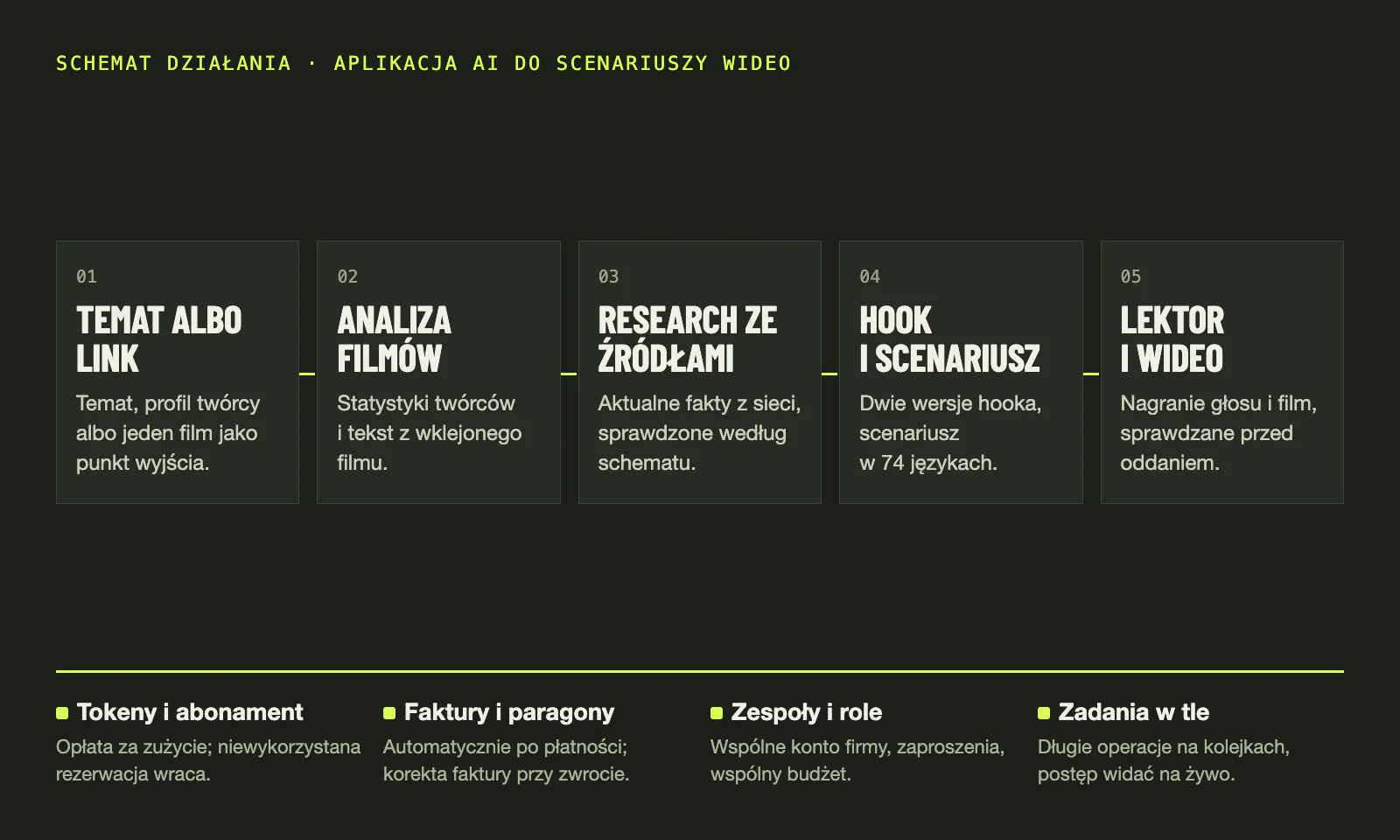
The diagram, step by step
I built the whole path from idea to finished recording. Here it is step by step: what you see on screen and what the system does in the meantime.
- Topic or linkYou type your own topic, leave the choice to the AI, or paste a link to one public TikTok, Reel or Short. The AI searches the web for current topics that fit your profile and avoids repeating your topics from the last 6 months. Before you start you see the token price for the whole order, up to 50 scripts at once.
- Video analysisYou add creators by handle and see their public videos with stats, with those on more than twice the account’s average views flagged. From a pasted video of up to 5 minutes the system transcribes the speech and extracts the style, hook mechanism, a template with gaps and the pace. A video with too little speech or no clear pattern is rejected.
- Sourced researchAn AI with live web search writes the research in the chosen language, with your profile as background. A fixed layout: key facts, myths versus reality, common mistakes, angles for videos and up to 10 sources. On several of them the system checks the publication date to judge how current they are. A pasted link skips this step.
- Hook and scriptWhen you start from a topic, the AI writes two hook versions from a library template, keeping the pattern’s mechanism and structure but not its words. The system scores both and keeps the stronger one, while in step-by-step mode you choose the hook and style yourself. Then the full script is written, with a quality check, in one of 74 languages.
- Voice-over and videoRecording starts only once the script has passed the quality check and moderation, the profile is complete, consents are current and your voice sample is in, plus a photo for video. The voice-over uses your voice from the sample, and the video is a talking presenter from your photo. Before a video is delivered, the system checks vertical format, resolution, sound and matching picture and voice length.
What runs in the background
Alongside the main path run four parts I built with it: billing, sales documents, company accounts and long jobs.
- Tokens and plansA plan adds a pool of tokens every billing period, and top-ups are one-off purchases. Every operation has a token price, and you see your balance, usage in the current period and the history of past periods as it changes. For voice-over and video, tokens are reserved up front and the unused part returns automatically.
- Invoices and receiptsAfter every payment, including renewals and top-ups, the system issues a VAT invoice when you give a tax number, otherwise a receipt. On a refund it issues the invoice correction itself, and flags a refunded receipt for manual bookkeeping.
- Teams and rolesA company account has five roles, with separate rights for payments and for the team. A team member’s invitation is valid for 7 days and only the account with the address it was sent to can accept it. Members spend from one monthly company allowance with an optional per-person limit.
- Background jobsLong operations run as background jobs on queues and on a schedule, so closing the tab does not stop the work. You see script, research, voice-over and video progress live, and if the connection drops, the page checks the status itself every few seconds.
When something goes wrong
For common failures I decided in advance what the system handles itself and when it stops with a clear message.
- Tab closed right after paymentThe payment is confirmed by a notification from the payment gateway, so closing the tab changes nothing. If a notification never arrives, the app asks the gateway every hour about open checkouts and completes the paid ones, and a separate hourly check fills in missing plan tokens and invoices from the last 7 days.
- A payment notification arrives twice or is forgedThe system checks the digital signature of every notification from the payment gateway. It rejects one without a valid signature and logs a failed check as a security event. A repeated notification is skipped, so tokens and the invoice never appear twice.
- An AI job stops halfwayIf the error happens before the job reaches the paid AI service, the tokens come back in full. If paid work has started, the system does not blindly repeat it, as the AI provider may already have charged for it: it ends the job with a clear message, and a retry is a new order.
- Voice-over or video gets stuckEvery 5 minutes an automatic check resends jobs that sat in the queue without starting. Recordings with no progress for 15 minutes are marked failed with a message, and cancellation is requested at the provider. You pay only for stages already sent to the provider, and the rest of the reservation comes back.
- The invoicing service does not respondThe system retries a failed document every 15 minutes, up to 5 attempts, and a failed email every 10 minutes. Before issuing, it checks by payment ID whether the document already exists, so no duplicate is created.
In numbers
- 74content languages: research, script and voice-over
- 4000+automated tests in the full run of 8.08.2026
- 60+background jobs, on queues and on a schedule
- ~20operator panel screens
Technology
- .NET 9
- Azure Functions
- Angular 21
- Azure SQL
- Azure Service Bus
- Azure SignalR
- Stripe
- Fakturownia
- Bicep
Before launch I do not name the app or its operator. Instead of screenshots I show how it works.
Have an idea
for an AI product?
Describe what it should do and for whom. I will reply with what a first version could include and what it costs.
Jonasz Jankowski · Direct collaboration · Mikołów (Silesia), remote across Poland
- I reply myself within one working day.
- A short call about the goal, features, materials and integrations.
- You get the scope in stages and a fixed amount before any work starts.